This topic covers example posting for two sales.
$100 sale paid via credit card. The card was charged $103, due to 3% surcharge.
Acme includes the 3% surcharge in the Cash Tray Reconciliation credit card amount.
$10 sale paid by debit card. No surcharge is added.
The processor charges 50 cent per debit transaction and a $20 monthly statement fee.
The processor deposits the full amount of the electronic payments taken each day. At month end they withdraw the 3% surcharged amount and any other fees like debit card, statement fees etc.
In summary, when the fees are deducted from your bank account you need to manually journal entry in this manner…
1.Payment Clearing – Debit the surcharge amount
2.Bank Account – Credit for the surcharge amount
3.Bank Account – Credit for any other fees
4.Expense Account - Debit for any other fees
A full example is shown in the table below.
There are four journal entries along with their totals highlighted in green. Debits are shown positive and credits are shown as negative numbers.
In most accounting systems you can enter a template General Ledger Journal Entry transaction that includes all of the accounts for “Processor Makes Deposit Daily” and another for “Processor Withdraws Fees EOM” so all you have to do is fill in the new amounts.
If you are viewing this online you may need to collapse the left hand navigation menu to see the full width of this table.
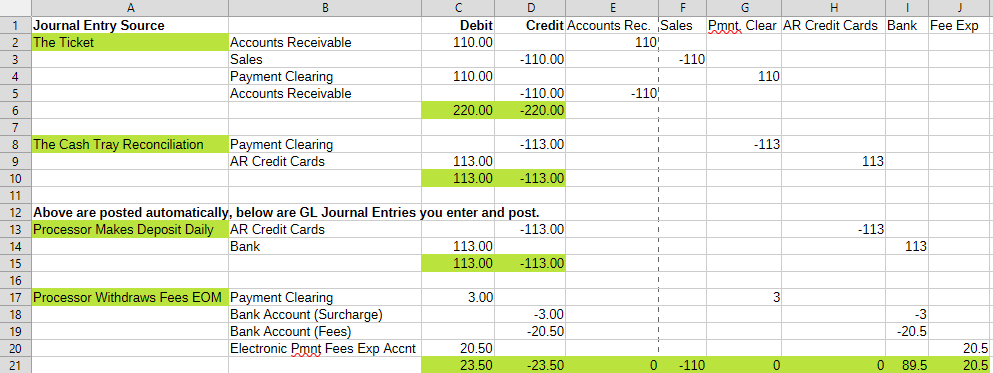
A copy of this spreadsheet complete with formulas is available upon request.
You can gather your info from reports available in the processor portal, your bank statement, Acme Cash Tray Reconciliation Report and/or the surcharge report in the Acme Data Miner.