>Items >General Tab > Consignment Item Number Assistant button
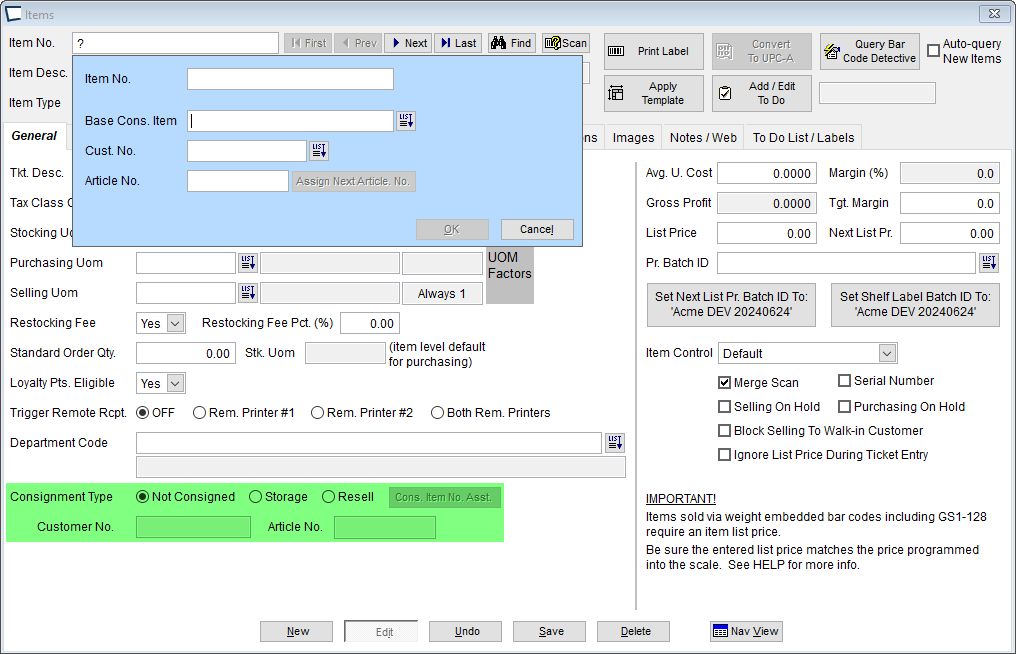
The assistant is activated by typing "?+[Enter]" for the item number on a new item record. Or activated by button while editing with an item set as consignment. The controls are not auto-fill as found elsewhere in Acme. However, if "?" is typed for "Base Cons. Item" or "Cust. No.", their respective lists appear.
The "Assign Next Article. No." button assigns the customer's next available article number starting with "0001".
Entering the item number automatically sets consignment type if the value appears to be a consignment item. The combined length of the consigned item number cannot exceed 25 characters.